Pages and pages of flipping pixels
 Ok, time for a brief aside from scrolling and a quick look at the CPC's pixel format and a nifty Z80 technique.
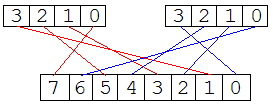
In Mode 0 we have 2 pixels encoded within each byte of display memory, but not in the worlds most straightforward format (as demonstrated by the diagram showing the bit mappings.)
Now what happens if we want to flip the left and right pixels over? No simple combination of rotates is going to manage it, so instead we'd have to resort to some basic arithmetic. And so, our naive Z80 routine looks something like this:
LD C, %01010101  ; [2]  This is our pixel mask

LD A, (HL)       ; [2] Fetch the byte to flip
AND C            ; [1] Strip out the right pixel
RLCA             ; [1] Shift it left
LD B,A           ; [1]
LD A,C           ; [1]
RLCA             ; [1] Shift the mask
AND (HL)         ; [2] Strip out the left pixel
RRCA             ; [1]
OR B             ; [1] Recombine the pixels
So that's a massive 11 NOPS per pixel pair (ignoring the setup cost). It's glacially slow. Damn. Clearly we can't afford to spend anything like that long, but pre-shifting all our graphics will surely be prohibitively expensive? Time for a rethink. Given that there are 256 possible combinations of pixels, all we need is a 256 byte table that maps any given byte on to it's flipped alternative. The Z80s 16-bit register pairs make this very efficient, as long as we page align the data. A page is a block of 256 bytes which share a common high byte (eg 0xFEnn), allowing us to perform an index lookup by direct manipulation of the least significant register.
So our improved code looks more like:
LD D,page        ; [2]  Initialise the lookup table pointer

LD E,(HL)        ; [2]  Fetch byte
LD A,(DE)        ; [2]  Flip the pixels
That's a mere 4 NOPs per pixel pair ignoring setup costs. A significant enough saving that we can easily justify the extra memory it requires. And it has the added advantage that by using a different lookup table we can apply special effects to our drawing, which may come in handy later on.
As an aside to the aside, Z80 coders not familiar with the CPC may well be wondering whats with all the odd timing info and the mention of NOPs. I'll make a proper post on it before I post too much more code, but for now just accept that 1 NOP = 1us and gives us a much more accurate instruction timing on the CPC.
posted by XeO3-CPC at
12:49 am


3 Comments:
Hehe, just having a bit of a brain dump whilst I try to remember all this stuff. :)
Mode 0 gives us 160*200 pixels in 16 colours without any restrictions on where colours can be placed (well a 16K bitmap had to be good for something, right!). It has "fat" pixels, much like a C64's low res mode.
The resolution I'm aiming at for XeO3 will give us 192*128 pixels. We won't see the pixel shift because our display is actually slightly wider than the visible area on the monitor and so it ends up looking nice and smooth.
By XeO3-CPC, at 8:13 am
Say, who not drop by cpcwiki.com and add your project to the, um, projects article? Would be nice to spread the word... :) Cheers,
Gryzor
By Gryzor, at 8:17 am
Eleven years late, but: the CPC runs at 256 cycles per line, and in Mode 0 outputs one pixel per cycle. Standard PAL timings are used so up to 52/64ths of a line can contain visible content. Which in theory makes 208 pixels but you'll never find a screen that doesn't crop a little more. So 192 is likely the maximum any equipment could ever show, if not perhaps a little larger than the maximum.
By Tom, at 11:27 pm
Post a Comment
<< Home